
Connect to the MSU on-campus WiFi as a Sponsored Guest.
1. Search and connect to “MSU-Guest”
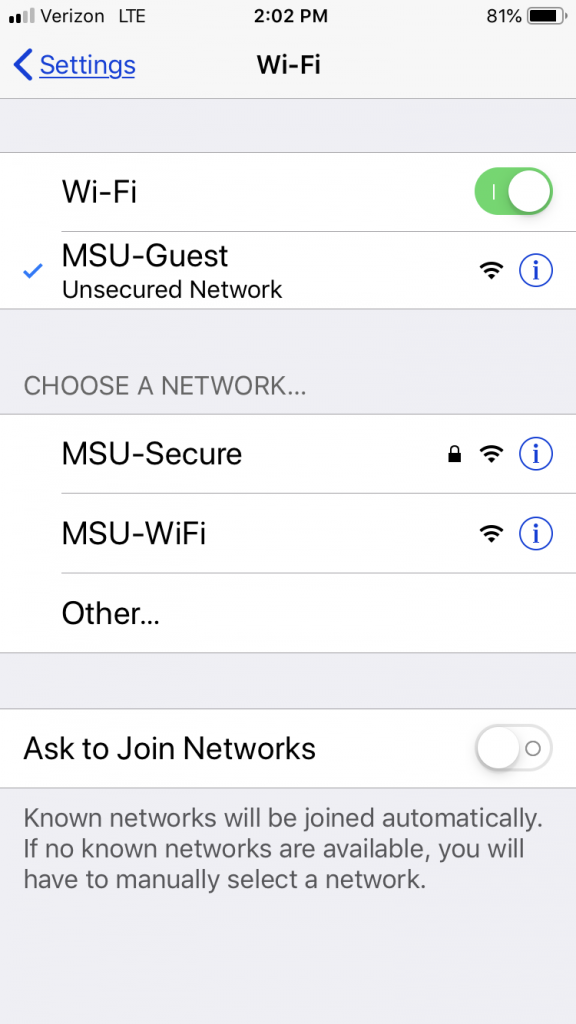
2. Once connected, open your Web-browser and go to 鈥渉ttp://www.montclair.edu鈥�
You will be redirected to the appropriate portal where you will be prompted for your 鈥淪ponsored鈥� Guest credentials. (Provided by your MSU Sponsor.)

3. Please enter the Username and Password that has been provided to you.
4. Read through and click 鈥淎ccept鈥� on the terms and conditions.
5. After the system validates your account, you鈥檒l be redirected to the MSU Guest Landing Page. You are now able to access the internet.
Note: If you do not have an account created by a campus faculty or staff, you can still use the MSU-Guest WiFi as a 鈥淪elf-Registered鈥� Guest by following the directions in the Guest Connect: Self-Registration.